Key Takeaways
- Digital sketch conversion can reduce repetitive preparation work and make the first draft less intimidating.
- A converted sketch is most useful as a guide for proportion, composition, and experimentation, not as finished art.
- Faster drafts let artists test more poses, layouts, lighting choices, and visual stories.
- Personal editing, observation, and original decisions are what keep the final work expressive and distinct.
- Artists should consider image rights, privacy, and consent before using photographs as references.
Why Artists Lose Time Before They Start Creating
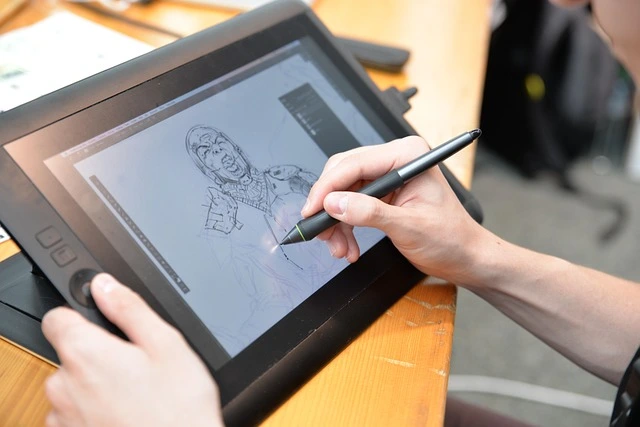
Many art projects begin with work that is necessary but repetitive. An illustrator may spend an hour blocking a scene, a portrait artist may repeatedly correct the angle of a face, and a concept artist may redraw the same object from several viewpoints before the real exploration begins. Preparation matters, but it can consume energy that would be better spent on storytelling, texture, color, and mood. An image to sketch converter online can help shorten that setup stage by turning a clear photo or reference image into a simplified working guide. Instead of facing a blank canvas, artists can begin with visible shapes, major lines, and a basic sense of proportion, then decide what deserves refinement or revision.
What Digital Sketch Conversion Actually Does
Digital sketch conversion translates a photo or visual reference into a line-based interpretation of its most noticeable forms. It may reveal the outside contour of a subject, large shadow areas, object edges, or structural lines in a building. The result is not automatically an illustration, and it should not be treated as one. A useful conversion is closer to an underdrawing, thumbnail, or composition aid. It gives the artist something to analyze. The artist still decides which lines matter, which details should disappear, how the image should feel, and where the work should go next.
How a Faster First Draft Improves the Creative Process
When rough proportions, perspective cues, and major shapes are easier to identify, artists can make earlier, higher-value decisions. They can experiment with loose or precise line quality, alter the palette, push the lighting, simplify the setting, or exaggerate a silhouette. This matters for comic artists preparing action panels, designers presenting early concepts, and hobby artists who want less friction between inspiration and practice.
A Simple Working Method
- Choose a clear reference with readable forms and lighting.
- Create a loose sketch guide focused on the largest shapes.
- Compare it with the reference and correct obvious structural issues.
- Change elements that do not support the intended composition or story.
- Build an original piece on top of the guide, then hide or remove it during refinement.
Speed Creates Room for Better Ideas
Speed is valuable when it produces more thoughtful choices, not when it encourages rushed art. One cautious draft may feel safe, but three quick studies can expose a stronger camera angle, clearer pose, or more compelling focal point. A character leaning forward may convey urgency more effectively than a straight-on stance. A tighter crop may turn an ordinary pet photo into an expressive portrait. Use one reference as a launch point for variation. Change the crop, object placement, line weight, lighting direction, palette, background, or realism level. A street-scene guide could become a rainy noir illustration, a bright travel poster, or a simplified architectural study. These deliberate changes help move work beyond imitation.
Use Converted Sketches to Study Form
Sketch guides can support observation across many subjects, including anatomy, plants, furniture, architecture, vehicles, and everyday still lifes. They are especially useful for studying proportion, silhouette, perspective, negative space, visual weight, and the relationship between light and shadow. The goal is not to unthinkingly follow every generated line. Compare the guide against the original image. Ask where the largest angle changes, which shadow defines the form, and what can be removed without making the subject unclear. Using several references for the same subject also builds broader visual understanding and reduces dependence on a single image.
What Digital Tool Research Suggests
Digital tools can meaningfully reduce production friction. MIT researchers detail a new automated vectorization algorithm that traces intersections without error, greatly reducing the need for manual revision, powered by a modified version of a mathematical technique called “frame fields.” That type of improvement can save artists time when working with animation, logos, and digital drawing cleanup. However, efficiency alone is not the same as stronger creative work. A 2026 study on GenAI-assisted design trade-offs found that faster, lower-effort workflows could also reduce editability, personal-style expression, satisfaction, and perceived creative value. Paired comparisons showed that GenAI significantly reduced perceived task difficulty and total workload and increased procedural efficiency. Still, these gains were accompanied by lower editability and weaker articulation of personal style, along with lower ratings of creativity, aesthetic value, satisfaction, and goal fulfillment. The practical lesson is clear: save time during setup, then reinvest it in editing, experimentation, and personal authorship.
A Practical Workflow for Different Artists
Illustrators can use guides to plan scenes and visual narratives. Portrait artists can test facial crops and expressions. Concept artists can quickly compare compositions before developing a world, vehicle, or prop. Comic artists can explore action lines and panel rhythm, while product designers can use rough guides to start early conversations with clients or teams. Students and hobby artists can benefit as well. Comparing the original reference, the guide, and the finished study makes visual decisions easier to see. It also reduces the fear of making a first mark, while leaving room for traditional drawing practice and improvement.
Keep Your Artistic Voice in the Process
Set a simple rule: make at least three meaningful changes after creating a guide. Change the setting, exaggerate a shape, alter the mood, combine multiple references, or introduce an unusual color rule. Then ask: What does this artwork say that the source image does not? Which choices reflect my taste? What can I remove to make the image clearer? Avoid low-quality references, accept-no-questions first drafts, and overly literal copying. Also, respect copyright, model consent, and privacy. A photo may be useful for study or planning, but responsible artists understand the limits to its reuse and sharing.
Measure More Than Time Saved
To test whether this workflow works for you, time a traditional preparation stage and compare it with a similar project using a sketch guide. Track setup time, revision time, and final development time. Then look beyond the clock: How many ideas did you test? Did the composition improve? Did you make enough personal changes? Did the process feel more confident and enjoyable?
Conclusion
Digital sketch conversion offers a quicker route from reference to rough idea. Its greatest value is the creative space it opens up. Use it to study form, test possibilities, and reduce repetitive setup, but let human observation, taste, and revision direct the final artwork. The best guide is one that helps an artist make more original decisions. By combining digital tools with personal creativity, artists can explore new styles, refine their techniques, and experiment with concepts that may have been difficult to visualize initially. These tools are most effective when treated as creative partners rather than replacements for artistic skill. With thoughtful adjustments, careful editing, and a clear artistic vision, digital sketch conversion can transform simple references into meaningful works that reflect both technological possibilities and individual expression.